

James, Junior Network Engineer
Adam, I keep hearing about Wi-Fi 7 everywhere. What’s the real upgrade compared to Wi-Fi 6/6E?
Adam, Senior Network Engineer
Think of Wi-Fi 7 as faster plus steadier. It improves peak performance and, more importantly, reduces slowdowns and latency spikes when the network is busy. It does this with wider channels, higher modulation, smarter scheduling, and multi-link connectivity.
James, Junior Network Engineer
People keep quoting crazy numbers like 46 Gbps. Should we treat that as real speed?
Adam, Senior Network Engineer
That’s a theoretical maximum. Real-world speed depends on factors such as available channel width, device capabilities, signal quality, interference, distance, and whether your wired network can actually carry multi-gig traffic. For most users, the noticeable gain is smoother performance under load, not just bigger speed-test numbers.
James, Junior Network Engineer
Got it. And what’s the big deal with Multi-Link Operation?
Adam, Senior Network Engineer
Multi-Link Operation lets compatible devices use more than one link across bands. If one band is congested or noisy, traffic can be shifted to the cleaner link. That’s why it can improve reliability and reduce lag spikes in gaming, video calls, and other real-time apps.
Opening Notes
Wi-Fi 7 (IEEE 802.11be) is the first Wi-Fi generation designed specifically for always-on, always-busy networks. The goal isn’t just to push higher peak throughput in speed tests. It’s to reduce the pain points people experience every day: latency spikes when multiple devices are active, sudden slowdowns in congested apartments or offices, and inconsistent performance when interference shows up in the middle of a wide channel. Wi-Fi 7 raises the ceiling on speed, but the bigger shift is how it keeps connections stable and responsive when your network is under pressure.
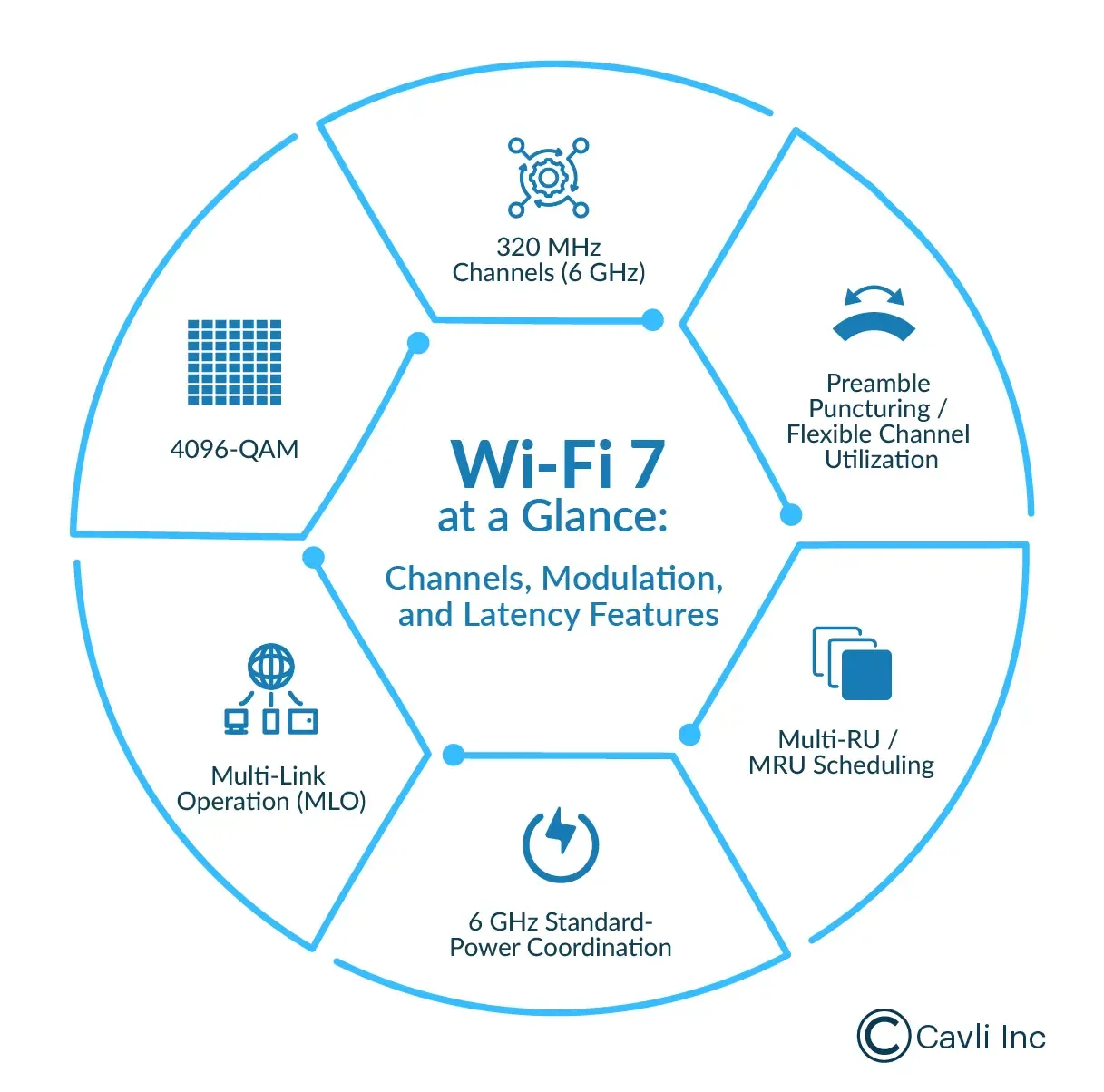
At a high level, Wi-Fi 7 improves both the usable spectrum and the way airtime is managed. It widens the “pipe” with 320 MHz channels (primarily in 6 GHz), improves spectral efficiency with 4096-QAM, and introduces smarter coordination features like Multi-Link Operation, preamble puncturing, and enhanced scheduling. The result is a Wi-Fi experience that is not just faster under ideal conditions but also more consistent when the network is busy
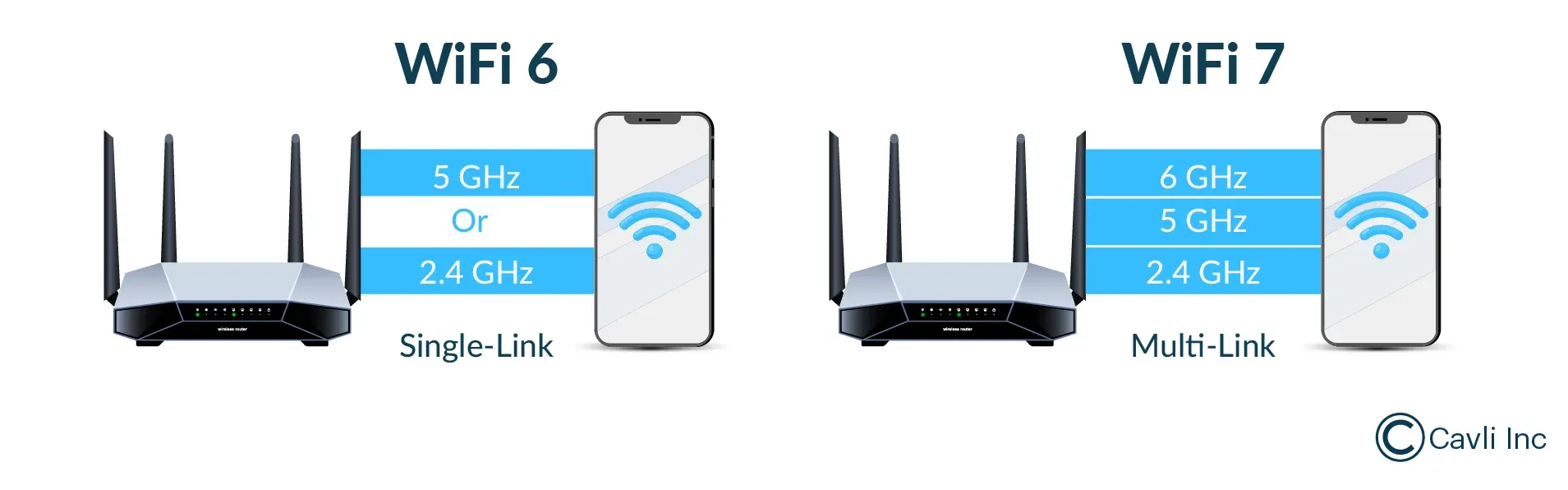
Evolution from Wi-Fi 6 and Wi-Fi 6E
Wi-Fi 6 (802.11ax) was all about efficiency. Instead of only chasing higher speeds, it focused on using airtime more smartly when many devices are connected at once. OFDMA enabled the access point to schedule multiple users more efficiently, uplink performance was enhanced for crowded networks, and Target Wake Time (TWT) made Wi-Fi more practical for battery-powered devices by allowing them to sleep and wake on a scheduled basis.
Wi-Fi 6E is built upon the Wi-Fi 6 foundation and extends it into the 6 GHz band. While the protocol itself remained largely unchanged, the shift to 6 GHz provided cleaner spectrum, reducing congestion and minimizing competition from legacy devices for the same channels
Wi-Fi 7 (802.11be) stands out because it upgrades both the available spectrum and the way the network operates. The wider 6 GHz channels expand their potential, while new PHY and MAC enhancements are designed to improve performance consistency under heavy load. In simple terms, Wi-Fi 7 isn’t just about being faster; it’s about performing more reliably when your network is busy.
Wi-Fi 7 vs Wi-Fi 6 vs Wi-Fi 6E: Key Specs Comparison
| Feature | Wi-Fi 6 (802.11ax) | Wi-Fi 6E | Wi-Fi 7 (802.11be) |
|---|---|---|---|
| Bands | 2.4/5 GHz | 2.4/5/6 GHz | 2.4/5/6 GHz |
| Max Channel Width | Up to 160 MHz | Up to 160 MHz | Up to 320 MHz (6 GHz) |
| Modulation | Up to 1024-QAM | Up to 1024-QAM | Up to 4096-QAM |
| Multi-Link Operation | No | No | Yes (MLO) |
| OFDMA Scheduling | RU Allocation | RU Allocation | MRU Enhancements |
| Wide-Channel Resilience | Limited | Limited | Preamble Puncturing (80 MHz and above) |
| Backward Compatibility | Yes | Yes | Yes |
Wi-Fi 7 throughput boost: What 320 MHz really enables?
The most noticeable Wi-Fi 7 specs upgrade is channel width. Wi-Fi 7 supports up to 320 MHz channels (primarily in the 6 GHz band), effectively doubling the 160 MHz ceiling commonly associated with Wi-Fi 6 and Wi-Fi 6E.
When a client device is close to the access point, and the RF environment is clean, wider channels can unlock significantly higher peak throughput. It also creates more headroom for multi-gig indoor distribution, especially in setups where the broadband connection, router backhaul, and local traffic are all pushing beyond 1 Gbps. This is where fast local file sync, wireless docking, and heavy media workflows feel smoother because the network isn’t constantly running out of capacity.
However wide channels come with a reality check: 320 MHz is not always available everywhere, and can be unstable in dense environments. Regional 6 GHz allocations, local rules, and operating modes determine how many wide channels can be realistically used. Even when available, dense environments like apartments and offices can make it harder to maintain consistent performance with ultra-wide channels. That’s why Wi-Fi 7 performance isn’t just about “does my router support 320 MHz” but “can my environment support it cleanly enough to benefit.”
Spectral efficiency in Wi-Fi 7: the role of 4096-QAM
Wi-Fi 7 raises the ceiling on spectral efficiency through 4096-QAM (4K-QAM). Compared to 1024-QAM in Wi-Fi 6, 4K-QAM increases how much data can be packed into each symbol.
The catch is signal quality. 4096-QAM delivers its best gains when the client has a strong SNR, minimal interference, and is relatively close to the access point. The biggest uplift tends to show up in the places where Wi-Fi already performs well. As you move farther away or the environment gets noisier, devices step down to more robust modulation schemes to maintain a stable link.
Even with this limitation, 4K-QAM still matters because it improves efficiency when conditions allow it. Faster transmissions on strong links mean less airtime consumed per unit of data, which indirectly helps the whole network.
Key Features of Wi-Fi 7
Multi-Link Operation (MLO)
Multi-Link Operation is the Wi-Fi 7 feature that most directly addresses the two problems people experience most: latency spikes and reliability drops when the network gets busy. In older Wi-Fi generations, a client typically associates and moves data on a single band at a time. With Wi-Fi 7, compatible devices can use more than one link across bands, giving the network multiple “paths” to work with.
What that changes in practice is simple: if one band gets congested or noisy, traffic can be shifted into the cleaner link instead of waiting. That’s why MLO can improve responsiveness for real-time apps like gaming, voice/video calls, and VR streaming.
Multiple Resource Units (MRU) and OFDMA enhancements
Wi-Fi 6 introduced OFDMA (Orthogonal Frequency-Division Multiple Access), allowing an access point to divide a channel into resource units (RUs) and schedule multiple devices efficiently. Wi-Fi 7 improves this with Multiple Resource Units (MRU), enabling more flexible RU assignment patterns.
This matters because real traffic is bursty. Some devices send tiny packets, others push heavy streams, and many do both throughout the day. MRU helps reduce airtime waste, improves scheduling flexibility, and supports more consistent performance when the network is under load.
Preamble Puncturing and Interference Avoidance
Wide channels sound perfect on paper. If you have 80, 160, or even 320 MHz of spectrum available, you expect higher throughput and more headroom for heavy traffic. However, real environments don’t stay clean. Interference often appears in just one part of that wide channel, like a single lane of a highway being blocked while the rest remains clear.
This is where preamble puncturing becomes a practical Wi-Fi 7 feature. The access point (AP), meaning the Wi-Fi device that creates and manages the network (your home router or an enterprise Wi-Fi unit), can skip only the interfered portion of the wide channel and continue transmitting on the remaining clean spectrum. Instead of downgrading the entire channel width from 320 MHz to 160 MHz or 80 MHz just because one segment is noisy, the network keeps most of the bandwidth usable and stays more stable under real-world interference.
Restricted Target Wake Time (R-TWT) and Energy Efficiency
Power efficiency is becoming a bigger Wi-Fi 7 conversation, especially for IoT. Wi-Fi 7 adds Restricted Target Wake Time (R-TWT), which builds on Wi-Fi 6’s TWT by coordinating and protecting wake windows more tightly. Devices can wake, transmit, and sleep with less idle listening and fewer collisions. The result is more predictable latency under load and better battery behavior for power-sensitive endpoints.
IoT-ready Wi-Fi 7: Predictable Airtime and Longer Battery
Many IoT devices intentionally operate on narrow channels (often 20 MHz) because they’re optimized for battery life, stable coverage, and predictable connectivity, not multi-gig speeds. Narrow channels are easier to reuse in dense deployments and are typically more tolerant of interference, which suits sensors that send small bursts of data and then sleep.
What’s notable about Wi-Fi 7 is that it’s expanding beyond high-performance Wi-Fi. It increasingly focuses on better coordination and efficiency for simpler endpoints. This is where R-TWT and smarter scheduling matter: deterministic wake windows can reduce idle listening and collisions, helping battery-powered devices last longer and remain more reliable in crowded networks.
Wi-Fi 7 Speed: What to Expect in Real Networks?
Wi-Fi 7 speed is often quoted at up to 46 Gbps, but that number is a theoretical maximum under ideal lab conditions. In the real world, performance depends on the channel width you can actually use (80/160/320 MHz), your client device capabilities (spatial streams and features like MLO), signal quality and interference, distance and wall losses, and whether your wired backhaul is multi-gig end-to-end.
For most environments, Wi-Fi 7’s bigger upgrade isn’t the headline peak rate; it’s consistency. Better scheduling and smarter interference handling are designed to reduce jitter and latency spikes when the network is busy, so real-time experiences feel steadier even with multiple devices online.
Wi-Fi 7 Reality Check: Spectrum Limits and Device Readiness
The biggest constraints with Wi-Fi 7 aren’t marketing claims; they’re deployment realities. 6 GHz availability and operating rules vary by region, and even in countries where 6 GHz is available, the number of reusable 320 MHz channels can be limited. In dense environments like apartments, offices, or campuses, this affects channel planning and can make ultra-wide channels harder to sustain consistently.
On top of that, Wi-Fi 7’s headline benefits don’t automatically appear just because you bought a Wi-Fi 7 router. Features like Multi-Link Operation only work end-to-end when both sides support them: the router/access point, the client device, and the OS/network stack all need Wi-Fi 7 capable.
Step-by-Step: How to Actually Benefit from Wi-Fi 7
- Start with your client devices: Wi-Fi 7 only feels like Wi-Fi 7 end-to-end if your laptop/phone/VR headset supports 802.11be and features like MLO. If most devices are still Wi-Fi 5/6, you’ll see partial improvements, but not the full feature set.
- Confirm 6 GHz is usable where you live: The biggest Wi-Fi 7 speed gains usually come from 6 GHz because wide channels are most practical there. If 6 GHz is limited or unavailable, you’ll still gain efficiency and stability improvements, but 320 MHz benefits won't be fully realized.
- Remove backhaul bottlenecks first: A common mistake is upgrading Wi-Fi while the wired network stays capped at 1 GbE. If your ISP plan, router uplink, or switch ports are capped at 1G, internet speed tests won’t reflect what Wi-Fi 7 can actually achieve.
- Tune channel width for stability: 320 MHz looks great in specs, but in dense networks, it can be harder to sustain effectively. Many real deployments perform better on 160 MHz (or even 80 MHz) because channels are easier to reuse and experience lower interference.
- Test under load, not just a speed test: The premium benefit is often smoother latency under load. Test while other devices are streaming or uploading, then watch for fewer latency spikes and less jitter in gaming, VR, or real-time calls.
Security in Wi-Fi 7
Wi-Fi 7 doesn’t replace WPA3 with a new security protocol. The security baseline is still WPA3, and most of the improvement comes from pushing modern defaults more consistently as networks upgrade.
In practice, Wi-Fi 7 is more secure when you configure it well: use WPA3 where possible, enable protected management frames, and separate IoT/guest devices onto their own SSID/VLAN. Better scheduling can improve reliability under congestion, but it doesn’t replace encryption or access control.
Closing Notes
Wi-Fi 7 is best understood as a reliability upgrade embedded in a speed upgrade. Yes, it raises the ceiling with 320 MHz channels and 4096-QAM. But the features that change day-to-day experience are the ones that help the network stay steady under pressure: multi-link operation, smarter scheduling, interference-friendly wide channel behavior, and more predictable device wake patterns. If you plan for the environment, match the router to the clients, and avoid bottlenecks, Wi-Fi 7 can feel less like a “new number” and more like a genuinely better network.
Amusing Tech Chronicles
Facts and Anecdotes related to this edition of Wireless By Design
The Multi-Lane Flyover

Imagine a city flyover with two parallel roads. If one road gets jammed, traffic can instantly shift to the other and keep moving. That’s how Multi-Link Operation feels in practice: instead of waiting behind congestion on one band, the connection can take the cleaner path.
The Pizza Slice Problem

Think of a 320 MHz channel like a big pizza. If one slice gets burnt, you don’t throw away the whole pizza. Preamble puncturing is the network skipping the “burnt slice” and still serving the rest, keeping most of the bandwidth usable.
The Alarm Clock for Sensors

Most IoT sensors don’t need constant attention; they need a clean schedule. R-TWT is like giving devices a coordinated alarm clock: wake up, send data, go back to sleep, without fighting everyone else for airtime.
Go Beyond and Explore
What is Wi-Fi 7 (802.11be)?
Is Wi-Fi 7 backward compatible?
Is 320 MHz always better than 160 MHz?
What is the most noticeable real-world benefit of Wi-Fi 7?
How do I know if I’ll actually benefit from Wi-Fi 7?
Why is real-time asset tracking crucial for businesses?
Author

Samenta Binoj
Junior Associate - Digital Marketing Cavli Wireless